

Appearance
Bonus types
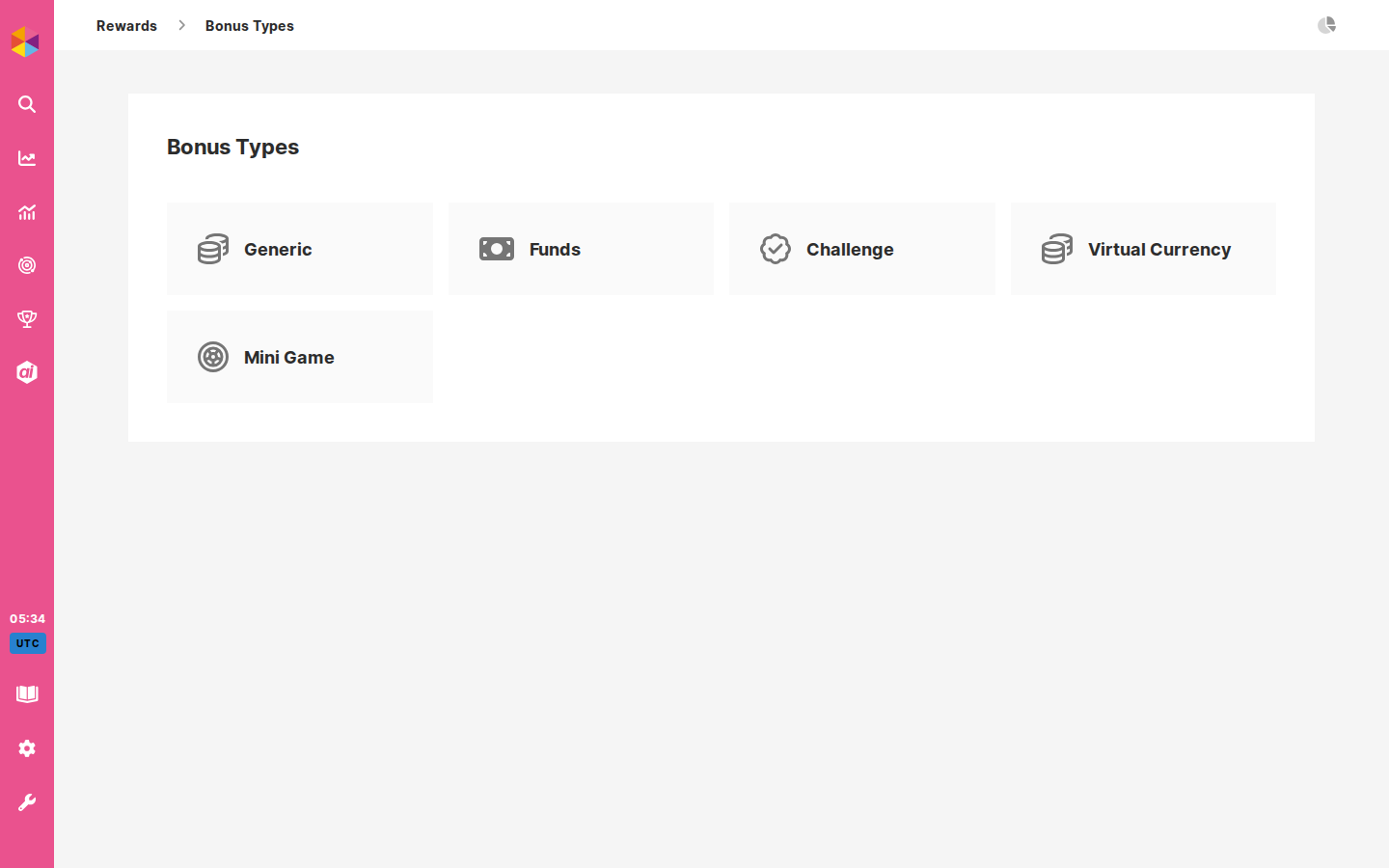
You choose the type before you create the bonus, on the Bonus Types page, and you cannot change it afterwards. The type decides three things: what the bonus can pay, which fields the form shows you, and — the one that matters most — who actually credits the player.
Who credits the player
Rewards owns some payouts outright. For the rest it is a courier: it holds the configuration, and at the moment of the claim it calls your platform and asks it to do the crediting.
| Type | What it pays | Credited by | Works without an integration |
|---|---|---|---|
| Generic | Whatever your platform understands — a promo code, free spins, an operator bonus id, a player role | Your platform | No |
| Funds | Bonus funds on the player's account | Your platform | No |
| Virtual Currency | An amount of one of your virtual currencies | Rewards | Yes |
| Mini Game | Tokens on one specific wheel or Pick & Win | Rewards | Yes |
| Challenge | The Challenge itself | Rewards | Yes |
| Tournament Points | Points on one tournament's leaderboard | Rewards | Yes |
The types Rewards credits itself work the moment you save them, because Rewards owns the wallet, the token ledger, the challenge state and the leaderboards. There is no integration to go wrong. The one catch is Tournament Points: a claim is refused, and the bonus stays unclaimed, until its tournament is running and the player is already in it.
Generic and Funds are different in kind. Rewards forwards the fields you configured and reports back whatever your platform said. If your platform does not recognise the promo code, or the bonus id has been retired, or the amount breaks a rule on its side, the claim fails — and it fails at the moment the player taps the button, not when you saved the bonus. Nothing in Rewards can validate the contents of a Generic or Funds bonus, because only your platform knows what a valid one looks like.
Generic and Funds bonuses are never validated on save
Rewards checks that your fields have names, and that a Generic bonus's Action Type is one it can route. It does not check the amount, the currency, the promo code, or whether your platform has heard of any of them. A misconfigured Generic or Funds bonus saves cleanly, passes a visual review, goes live, and fails for every player who claims it. Always claim one yourself on a test user before you attach it to a campaign — that is what Test Bonus on the bonus page is for.
Generic
A Generic bonus is a passthrough. It has no structure of its own: you define the fields, and on claim they are flattened into a set of key/value pairs and sent to your platform exactly as configured.
That is what makes it the catch-all. Anything your platform can be asked to do for a player can be modelled as a Generic bonus — free spins, a deposit bonus code, a cashback credit, a loyalty role, an entry in a third-party promotion.
Two fields do the work:
- Action Type decides where the request goes. It is required, and its options come from your CRM's action-type catalogue. The standard one is Credit Bonus — credit a bonus on your platform by code.
- The action fields underneath it decide what is sent. They change depending on the Action Type. For a Credit Bonus action these are typically Bonus Identifier (your platform's own id for the bonus), Bonus Code (the promo code) and a days-until-expiry field.
Besides crediting a bonus by code on your own platform, the Action Type can credit an EveryMatrix bonus code, assign an EveryMatrix player role, or fire an HTTP callback to an endpoint your integration has registered. Which of those your account offers depends on what your integration supports; the field only lists action types your CRM knows about.
Two Generic traps on older bonuses
A wrong or missing Action Type. Saving now refuses an Action Type Rewards cannot route, with am_config.NotificationType is unsupported for generic bonuses, and Enable Bonus refuses a bonus whose Action Type was never set. A Generic bonus saved before those checks can still carry one. It then fails at claim time: the request is rejected with unsupported generic bonus notification type, which the player sees as a generic failure to credit.
Do not pay funds from a Generic bonus. Saving a Generic bonus with a funds Action Type is now refused. An older Generic bonus that already has one is routed as credit a bonus by code, because the match is on the "Credit Bonus" prefix. Your platform gets a code-based request instead of a funds request, and the money never arrives. To pay bonus funds, use the Funds type.
Funds
A Funds bonus credits bonus money on the player's account. There is no Action Type to choose — a Funds bonus has exactly one route to your platform, so the field is not shown at all. The form goes straight to the payout fields, typically Bonus Code, Amount and Currency.
Those fields are configured per brand, not fixed by Rewards, and Rewards validates none of their contents: there is no amount it understands, no currency check, no wagering-requirement field. What they mean is entirely the contract between your integration and your platform.
Rewards does not require a bonus code on a Funds or Generic bonus. Most platforms do. If you leave it out, the bonus saves and the claim fails.
One thing Rewards does add for you, on Funds and Generic bonuses alike: if you have not configured an origin field, the player's actual origin is filled in before the request goes out, so your platform never receives an empty one. If you have configured one, yours is used as-is.
Virtual Currency
A Virtual Currency bonus credits an amount of one of your own currencies — the coins, points or gems you run inside Rewards — into the player's wallet.
It needs two settings: Virtual currency (which one) and Virtual Currency Amount (how much, greater than zero). The currency has to exist before you can pick it.
Two things are worth knowing about the wallet:
- The balance is a single running total. Crediting adds to it. There are no per-grant lots and no separate pots.
- Credited virtual currency never expires. The wallet has no expiry at all. If you put a validity on a Virtual Currency bonus, that is a deadline for claiming the bonus — miss it and the coins are never credited. Once they are in the wallet they stay there until the player spends them in the Shop.
A currency is also only visible to a player if it has been enabled for their origin and communication profile. A player who cannot see the currency can still be credited it; they have nowhere to see the balance.
Mini Game
A Mini Game bonus is how plays get into players' hands. It grants tokens — one token is one play — on one specific wheel or Pick & Win.
Its settings are the game (Mini Game), Tokens (how many, greater than zero) and Token expiry.
Token expiry is not the bonus's expiry, even though both sit on the same form. The bonus's own validity is the deadline to claim it; Token expiry is how long the tokens last once they have been credited. Set only the first and the player ends up holding tokens that never expire. Set only the second and the offer card sits in their account indefinitely. Set both, or tie the tokens to the bonus with Inherit Expiration, which is being rolled out. Expiry and validity has the full picture.
Two naming quirks follow this type around. In the player-facing panel a Mini Game bonus reports itself as the game's own type — Wheel, Pick & Win — rather than as "Mini Game". And in the bonus picker used by campaigns, calendar doors, shop items and prize ladders, Mini Game bonuses appear under a group headed Wheel, Pick & Win ones included.
For the whole chain from game to token to prize, see Giving players plays.
Challenge
A Challenge bonus is the odd one out: what it pays is a task. Claiming it does not credit anything — it starts the challenge for the player. The challenge then tracks their progress, and when they complete it, it releases the bonuses you attached to it.
So a Challenge bonus has two faces the player sees at different times: the offer card before they accept, and the challenge itself while it is in progress. The form reflects that with two appearance blocks.
Because a Challenge releases other bonuses on completion, those bonuses have to exist first — you pick them from a dropdown while configuring the challenge. See Rewards on completion.
The challenge type is chosen when you first save and is then fixed: Challenge type cannot be changed after being saved. All variations of the same bonus must use the same challenge type.
Challenge configuration — the types, the progress models, the requirement fields, the timezone — is its own subject, covered in Challenges.
Free spins
There is no free-spins bonus type. Free spins are built as a Generic bonus carrying your game provider's promo code in a field, usually named Bonus Code, with an appearance that tells the player what they have won.
That is not a workaround; it is how free spins are meant to be configured. The provider owns the spin — the game, the bet level, the number of rounds, the wagering — and all Rewards needs to do is hand your platform the code that unlocks it. Which is exactly what a Generic bonus does.
Practically, that means:
- The wording the player reads ("20 free spins on Jungle Rumble") is copy you write in the appearance fields. Rewards does not know it is about spins and will not check that the copy matches the code.
- If the promo code changes, you edit the bonus — and only future awards pick it up. Players already holding the old one still hold the old code.
The retired Free Spins type
A Free Spins type existed in an earlier version of the product. It has been retired, and it is worth knowing that so you do not go looking for it.
It is not offered on the Bonus Types page, a new one cannot be created, and an old one cannot be claimed — the claim is refused with unsupported bonus type for claim: freespins. It is no longer offered in the CRM's Credit Reward action either, so a surviving row from a long-standing account cannot be attached to a new campaign. If you find one, rebuild it as a Generic bonus.
Tournament Points
The Tournament Points type is being rolled out. Some brands already have it on the Bonus Types page.
A Tournament Points bonus adds points to a player's score in one tournament. It needs two settings: Tournament (Click here to select a tournament) and Points, a whole number greater than zero. Anything else is refused with Must be a whole number greater than 0.
The list offers every Casino - Total Bet Amount, Sports - Bets Won and Custom tournament whatever its status: drafts, so you can build the bonus before you launch, but also ended and stopped ones, so check the status before you pick. Casino - Highest Win Multiplier tournaments are left out, because a best-multiplier score cannot be added to. If the tournament you saved is deleted or no longer qualifies, the editor tells you so and will not save until you choose another.
What makes this type different is that the claim depends on the tournament. It only succeeds while an instance is running and the player is already in it. Until then the bonus waits, unclaimed. Custom scoring explains the rules, and the trap of awarding points for a tournament that has finished.
How types appear in the CRM
The Credit Reward action does not show you these types one for one. It shows five synthetic ones, because it groups by what a campaign manager is choosing between rather than by what the data model calls things:
| Reward Type in the CRM | Which bonus types it covers |
|---|---|
| Bonus | Generic and Funds |
| Challenge | Challenge |
| Mini Game | Mini Game |
| Tournament Points | Tournament Points |
| Virtual Currency | Virtual Currency |
Once you have picked a Reward Type, the bonus picker underneath groups by the underlying type, and it takes its group names from the bonus catalogue rather than from the field above — which is where Mini Game bonuses turn up under a heading reading Wheel. On newer screens that heading reads Mini-Games. Both are the same bonuses.